


How to read your reports
A walk through the owner statement, cash flow, income statement and rent roll, line by line, using one example owner's reports: what each number means, why a payout can be smaller than a month's income, and which report to give your accountant.
The example in this guide
Every picture in this guide is a real Doorvest report, made by the same code that makes yours, for an owner we made up: Juniper Hollis. Juniper owns two homes. 123 Main St is a single-family home. 45 Maple Ave is a duplex with two units. The names, addresses and amounts are invented.
Your own reports come from Generate report on the Ledger & docs page, with Doorvest layouts on (it is on unless you turned it off). Turned off, you get Rentvine's original files instead. The numbers are the same either way; only the layout differs.
Open Ledger & docsRead your owner statement
The owner statement covers one home for one month (or the dates you choose). It reads top to bottom: a plain-English summary, the totals, the totals by category, every transaction, and the home's units and leases.
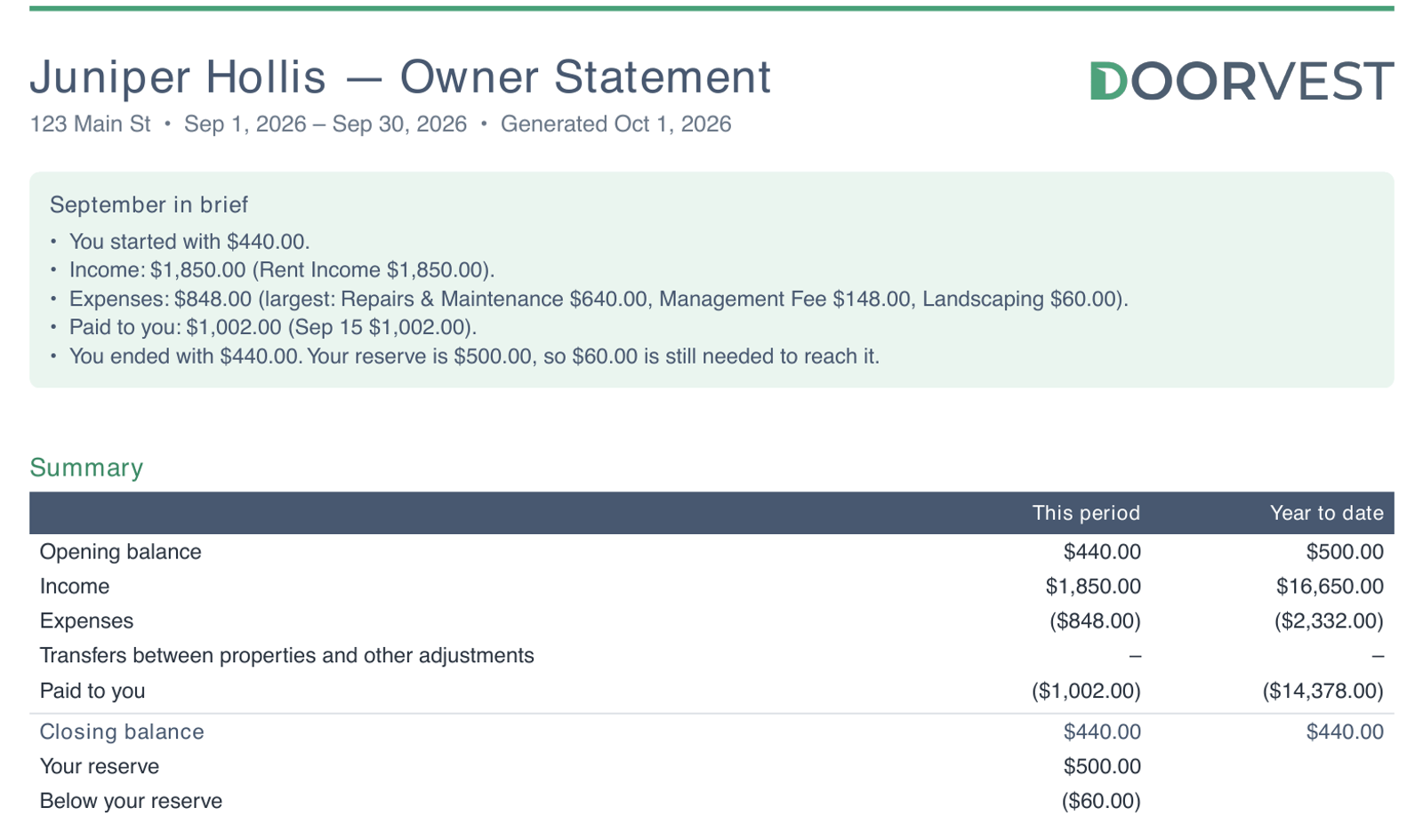
September in brief says the month in five sentences: what the home started with, what came in, what went out, what was paid to you, and where the balance ended. If you only read one part, read this.
- Opening balance
- The money in the home's account on the first day. For Juniper, $440.00.
- Income and Expenses
- Rent and other money in; bills, fees and repairs out. Expenses print in brackets because they are money leaving the account.
- Transfers between properties and other adjustments
- Money moved between your own homes, or carried in from earlier books when Doorvest started managing a home. A dash means there were none.
- Paid to you
- Your payouts (owner distributions) in the period.
- Closing balance
- What was left in the account on the last day.
- Your reserve
- The amount kept in the home's account to pay bills before anything is paid to you.
- Above or Below your reserve
- The closing balance minus the reserve. Below means the next payout tops the reserve back up first.
This period is the month. Year to date runs from January 1, or from the day you bought the home if that was later. Its opening balance is the balance on that first day, which is why it differs from the month's.
Follow the money line by line
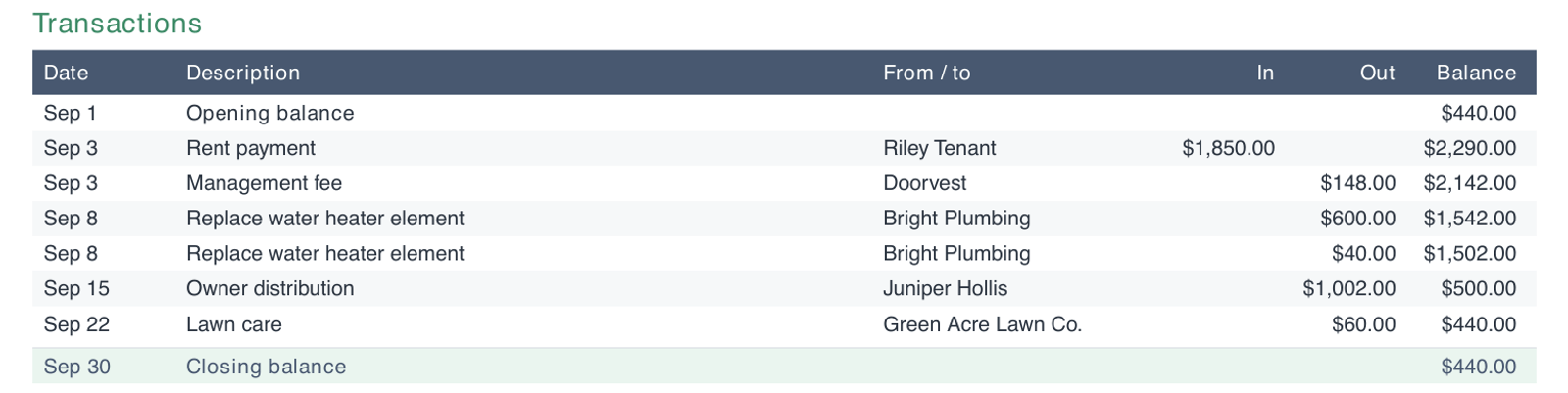
The Transactions table lists every line on the home's ledger for the period, oldest first. Balance is the account after that line, so each row is the row above plus In minus Out. Start at the opening balance and you can walk to the closing balance one line at a time.
Why does the same repair appear twice?
When a vendor bill carries a management markup, it posts as two lines with the same description: the vendor's bill and a smaller markup line. In the example, the plumber billed $600.00 and the markup was $40.00, so the repair cost $640.00 in all. It is one job, not a duplicate charge.Why a payout can be smaller than the month's income
A payout is not the month's rent minus the month's fees. It is what is in the home's account above the reserve on the day it is paid, after the bills that came in before it. Juniper's September shows how that works:
- The month opened at $440.00.
- Rent of $1,850.00 came in, and the $148.00 management fee went out.
- The water heater repair ($640.00) was paid before the payout.
- Everything above the $500.00 reserve was paid out: $1,002.00, against $1,642.00 in August. The difference is the repair.
- Lawn care ($60.00) was billed after the payout, so the month closed at $440.00, $60.00 below the reserve. October's payout tops the reserve back up before anything is paid out.
The usual reasons a payout comes in smaller, all of which the statement shows:
- A repair or other bill paid before the payout (in Expenses and in Transactions).
- The reserve being topped back up after a month that ended below it (the Below your reserve line).
- Rent that came in late or short, which shows as lower Income for the month.
On the Annual Plan, the management fee still appears each month, with a matching line that draws it from your prepaid credit, so the two cancel out and the fee does not come out of your payout. The management plans guide shows how that reads.
Read the cash flow report
The cash flow report follows the cash in your homes' accounts over a period, month by month. With several homes it puts them side by side, with a total for all of them. The first page is the summary.
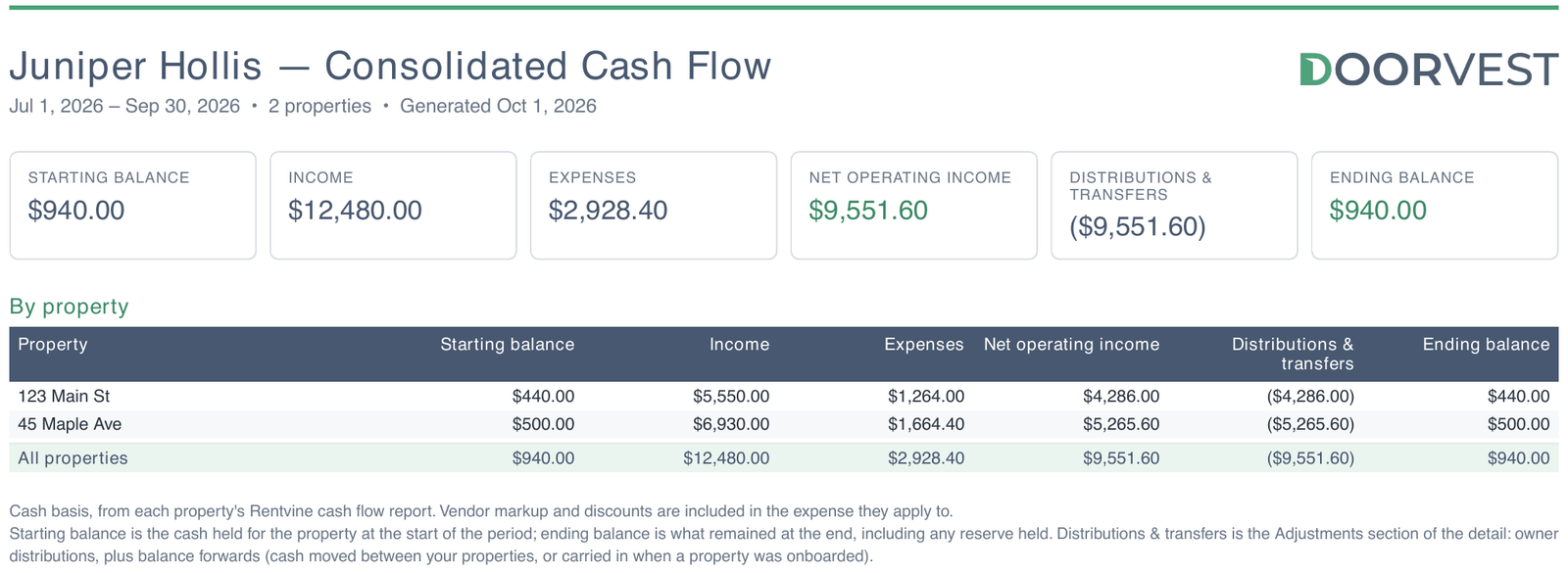
Read the tiles left to right; each one leads to the next:
- Starting balance
- Cash in the accounts on the first day ($940.00 for Juniper's two homes).
- Income minus Expenses = Net operating income
- What the homes earned after running costs: $12,480.00 minus $2,928.40 is $9,551.60.
- Distributions & transfers
- Your payouts, plus any money moved between your homes or carried in when a home was onboarded.
- Ending balance
- Starting balance plus net operating income plus distributions and transfers. It includes the reserves.
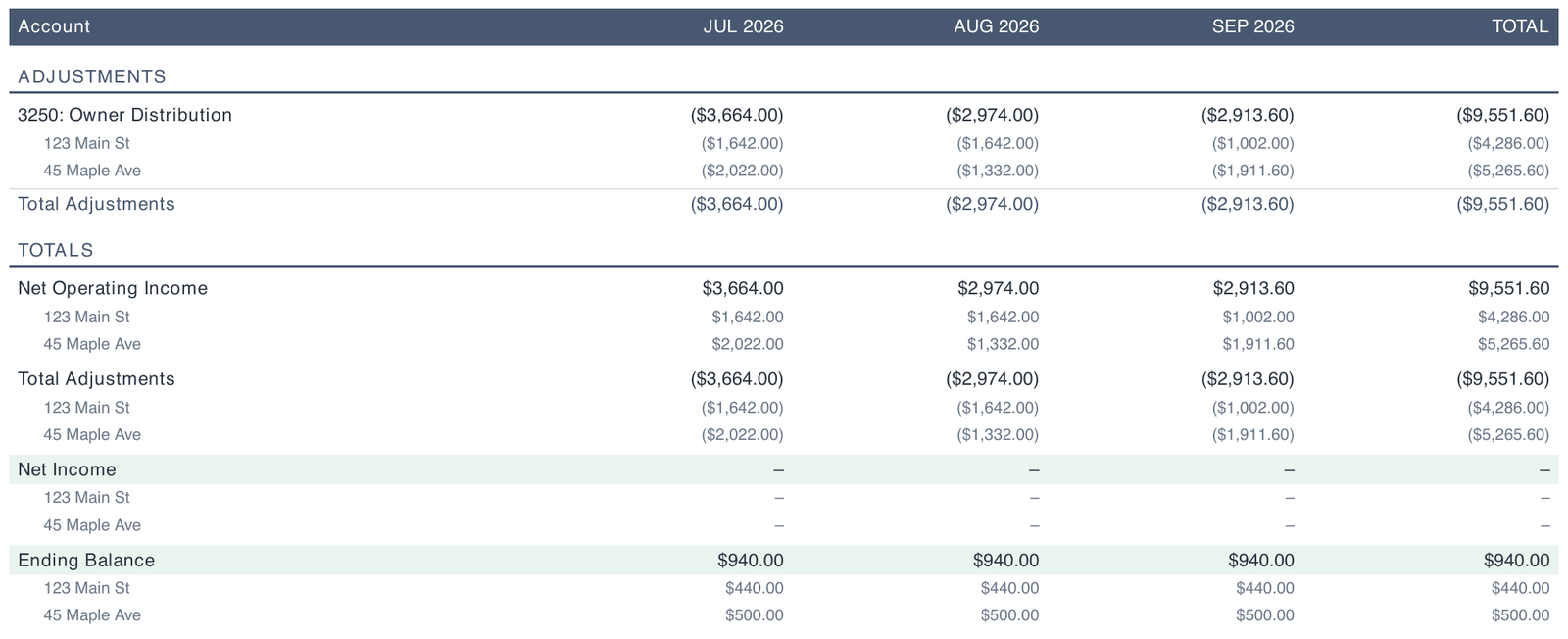
The pages after the summary are the detail: every account, by month, with a line under it for each home. The last page adds it all up.
Why is "Net Income" zero?
On the cash flow report, Net Income is net operating income plus the adjustments, and your payouts are adjustments. When everything a home earned in a month was paid out to you, as here, the two cancel and Net Income prints as a dash. That is a healthy month, not a month with no income: the income is in the Net Operating Income line above it.Read the income statement
The income statement is the profit-and-loss view: income and expenses only. Payouts, transfers between your homes and money held in reserve are left out, because they are not income or expenses. That makes it the report to give your accountant.
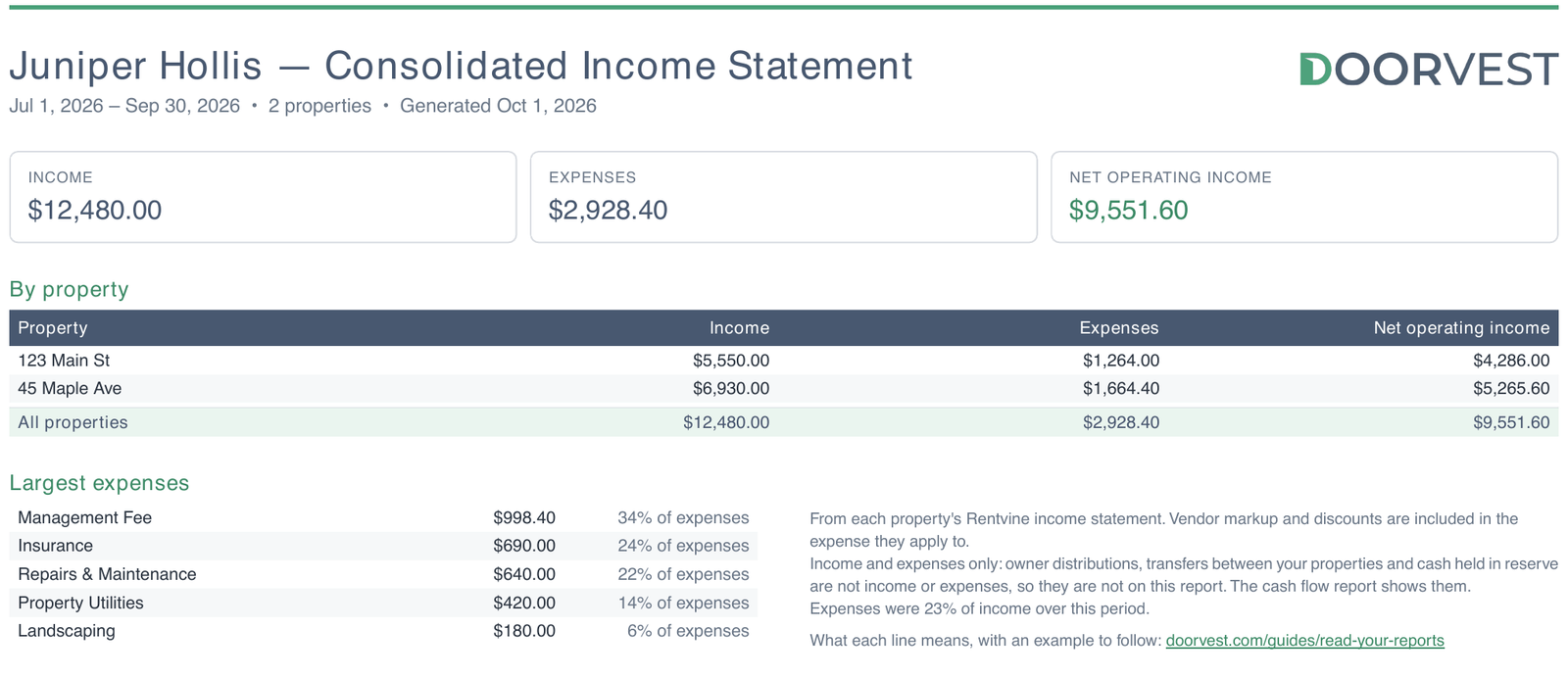
Net operating income is income minus expenses, $9,551.60 here, the same figure as on the cash flow report for the same dates. Largest expenses lists what cost the most and its share of all expenses; for Juniper that was the management fee, at $998.40. The note under it gives expenses as a share of income for the whole period.
Read the rent roll
The rent roll is a snapshot of your leases on one date: who lives in each unit, the rent, the deposit held, and anything a tenant owes.
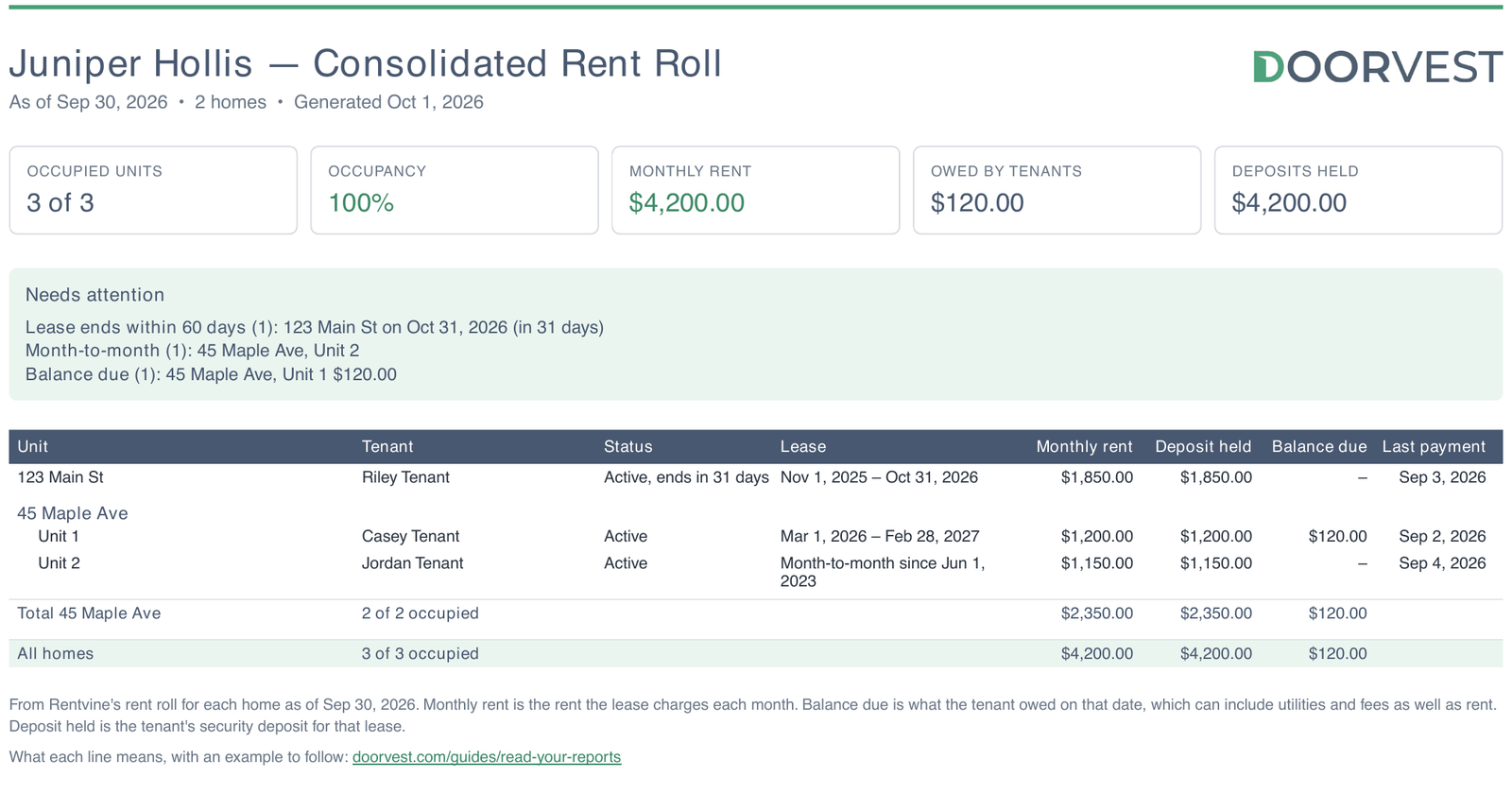
- Monthly rent
- The rent the leases charge each month ($4,200.00 across Juniper's three units), not what was collected.
- Owed by tenants
- What tenants owed on that date ($120.00 here). It can include utilities and fees as well as rent.
- Deposits held
- The tenants' security deposits for their current leases.
Needs attention lists the units worth a second look, so you can ask your Doorvest team about any of them.
- Lease ends within 60 days
- A renewal is coming up (123 Main St, in 31 days, in the example). The lease renewals guide explains what happens next.
- Month-to-month
- The lease has no end date, or ran out and the tenant stayed on. Rent is still due every month.
- Balance due
- A tenant who owed money on that date.
- Vacant
- A unit with no lease.
When two numbers do not seem to agree
- Net operating income is higher than what you were paid
- Net operating income counts the period's income and expenses. A payout also depends on the reserve and on when bills and rent landed around payout day. See why a payout can be smaller.
- This month's opening balance is not last month's closing balance
- They are the same day's balance, so they should match. Check that both reports cover the same home: a cash flow report for several homes adds their balances together. If one home's still differ, message your Success team with both reports.
- The Doorvest report and Rentvine's look different
- They are two layouts of the same books, and the totals match to the cent. The Doorvest layout adds the summary page and plain labels.
- The year-to-date column is shorter than a year
- Year to date starts on the day you bought the home when that was after January 1, and months before Doorvest managed the home are not in our books.
Which report to give your accountant
- Income statement for the year (choose Last year): income and expenses by category, per home. This is the profit-and-loss statement most tax preparers ask for.
- Cash flow for the year: the same plus your payouts and balances, if they want to see where the cash went.
- An Excel or CSV copy of either, from Format in Generate report, if they work in a spreadsheet.
Tax forms are not something you generate. For those, message your Success team, or email success@doorvest.com.
Common questions
Why was my payout less than my rent minus fees?
What is net operating income?
What does "Below your reserve" mean on my statement?
Why does my cash flow report show Net Income as zero?
Which report should I give my accountant?
Still stuck?
Email your Doorvest team at success@doorvest.com and we will get back to you.